100% Security
Instant Download 24/7
10+ Years of Service

Need Some Help?

All orders are provided by download and immediately upon ordering. More questions? If we're online, reach our to us on the Store Live chat located bottom right. Also see Questions and Answers. If we're offline, contact our Support team from the Contact Us page.

0 Reviews
$705.55
$734.95
Save 4%

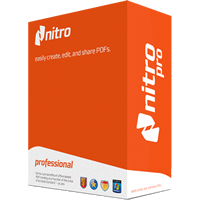
Nitro Pro 11 [x5]

includes five separate Nitro Pro 11 licenses

Need Some Help?

All orders are provided by download and immediately upon ordering. More questions? If we're online, reach our to us on the Store Live chat located bottom right. Also see Questions and Answers. If we're offline, contact our Support team from the Contact Us page.

Platform
Windows 10
Windows 7 (32 bit)
Windows 7 (64 bit)
Windows 8
Windows Vista
Windows XP
Version
11
Manufacturer
Twitter
Last Updated
08 February 2017
Download Size
2.40 MB

PDF files are quite simply the best means of sending a document to somebody else in a format you’ll know will appear exactly as you intend it to on their computer. It doesn’t matter what application has been used to create the original document, by exporting it as a PDF you ensure it won’t change appearance when viewed elsewhere.

These days, you can create PDFs without having to shell out for the privilege – once of the best free tools for creating PDFs comes in the form of the excellent Nitro Reader. But PDF files need to do more than simply replicate the original design of a document – they’ve become increasingly interactive, with form-filling, annotations, digital signatures and much more.

Some free PDF tools give you limited access to interactive features, but what if you want to go further? Perhaps you need to make minor alterations to the actual PDF document itself, or want to split or combine multiple documents into a single file? In the past, actually editing a PDF document meant an expensive purchase, but now Nitro Pro brings all the advanced functionality you need within the reach of individuals and small businesses too.

Nitro Pro – as you’d expect – allows you to create fully editable PDFs from any application, whether through dedicated conversion options as found in Microsoft Office 2003 or later, or by using its virtual print driver, which allows you to “print” your PDF from within any application. Nitro even allows you to combine multiple documents from a myriad of different sources together via a single dialog: just drag and drop your files into place, tweak the running order and let Nitro do the rest.

Nitro Pro also lets you edit the text and images in a PDF, swapping images, correcting typos or even editing entire paragraphs of text, plus adding headers/fooders and watermark. You can even convert existing PDFs back into editable documents, preserving the original layout – Word, Excel and a number of text formats are currently supported – plus extract images and text from the PDF easily.

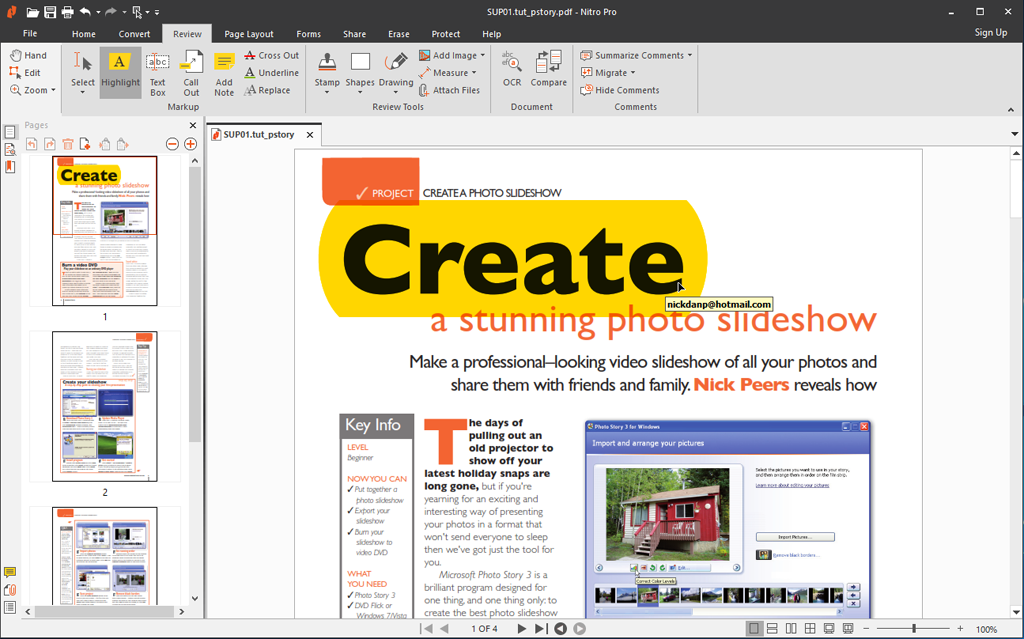
Throw in powerful collaboration and annotation tools – 100 per cent compatible with Adobe Acrobat, approval controls, digital signatures and form filling, plus the ability to secure and protect PDFs by restricting access and usage, and you’ve got just about everything you need from a powerful PDF editor. And the good news is that all that power isn’t hidden away – unlike rival products, Nitro utilises the familiar ribbon-like interface found in Microsoft Office, ensuring all its tools are both accessible and easy to use.

Other highlights include an OCR engine as standard for extracting editable text from scanned documents. A new smart alignment engine makes it easier to enter text neatly into non-interactive forms, while auto-save and recovery reduces the painful consequences of possible data loss. Performance has been improved too, with both conversion times and output file sizes reduced.

Includes version includes five separate Nitro Pro 11 licenses.

Review by Nick Peers.

Performance Issues?

Most system performance issues are often a result of other software clashing with your brand new software. For instance, security software can clash with a background process, such as a system maintenance tool or defragmentation software. Another cause of system slowdown, is a result of two software applications performing a similar task. As an example, Windows includes a firewall switched on as a default. Your new security suite is likely to include a firewall. You only need one firewall running. In this example, try turning off your system firewall.

Uninstalling Your New Software

Occasionally you may need to either temporarily or permanently remove your new software.

On a Windows computer, go to the Control Panel and choose Programs and Features. Locate the program within the list, then click it to highlight it. Finally, click the Uninstall button at the top of the list and follow the instructions to remove the program from your PC.

On an Apple Mac computer, using Finder, locate the Applications folder. Within the Applications folder, find the name of the application you wish to remove. Simply drag the icon to your Trash icon in your dock. Empty the Trash to remove the files from your computer.

Still Having Problems?

If you cannot solve your system performance issues or are struggling to remove your software, we advise contacting the software manufacturer. If you placed an order, see the section in the order which states Support options. Alternatively, go to the Contact Us page to contact store support directly.

Frequently Asked Questions

Find quick answers to the most common questions about our services and platform

How Do I Order Software?
Simply select the software you want to order by clicking the "Buy Now" button or, where the option exists, clicking on "Upgrade". The upgrade option enables you to upgrade from a previous version of the software. When you click "Buy Now" you will be taken to your shopping cart, powered by Cleverbridge, where you can choose a payment option and then receive your download and serial code within seconds, after making your payment.
What Is The Extended Download Insurance?
When you order software online, you receive a digital download and a serial code by email. You normally have 30 days from placing the order to download your software, if you need to download again in the future. You can choose to extend this to two years, enabling you to login to your account and find your download, serial code(s) and your original invoice. Ideal if you need to re-install your software, suffer from a system crash or buy a new PC. Simply had to the "My Account" section on this store - or any one of our worldwide stores - to access previous orders.
Do I Need A Backup CD?
No, although some people like to receive a copy of their software on a CD which they can store indefinitely. We provide a backup CD for some applications in the store. For example, we can provide an official colour booklet and installation/backup CD for AVG and Kaspersky software ordered through the store. Some software suppliers, such as Nitro PDF and Paragon Software, will supply you directly with a backup CD if you include this with your order.
Why Are Some Prices Dynamic?
If you are based in New Zealand and you see prices in NZD, you may see a different price in your checkout than we advertise in the store. There's a good reason for this - software suppliers set their prices in USD, GBP and EUR, with NZD and other prices calculated based on the exchange rate and often between USD and NZD. Therefore some prices may be slightly cheaper or more expensive than the advertised price as the prices in the checkout are calculated, on-the-fly, from USD. This does not apply to customers in the EU, UK, US, Canada and Australia.
Why Was My Card Declined?
In most instances this will be due to fraud protection from your credit card provider. Although you have protection when you purchase goods, online, through your credit card, your company may decline a large order or an order made through an online store for the first time. If your card is declined, we suggest you speak with your card provider and/or your bank. You can also pay through PayPal, wire transfer or other payment formats.
Can I Ask For A Refund?
We strongly suggest you download and test trial software before placing your order. Trial software is provided to enable you to determine whether it's applicable for your system and meets your requirements. Once you are happy with your trial software, place an order. Digital downloadable software often cannot be refunded unless the order was placed in error. Activated software cannot be refunded as the code becomes the property of the customer and cannot be resold or reused. If you ordered in error or there is another problem with your order, contact PayPro directly for a refund.
Who Keeps Our User/Order Information?
Your transaction is between yourself and e-commerce providers PayPro. PayPro will NEVER re-use your information, pass on to a third party and will not contact you unless you contact them with a query. Your credit card information is not kept on file and is not stored by any third party. If you ordered Extended Download Insurance with your order, we retain basic information about your order on our secure server. This includes your name, email address (required to access your account), serial codes ordered and download links to your software. No-one has access to this information apart from yourself. This information is only available once you have registered your account using the email address you used to place the order.

Write a review

Nitro Blog

Nitro News & Culture 01 July 2021

The Importance of Taking Time to Unplug and Recharge

Reading Time: 2 minutes “There is virtue in work and there is virtue in rest. Use both and overlook neither.” ― Alan Cohen  Today marks the first day of our inaugural Summer Recharge Break at Nitro. ...
The post The Importance of Taking Time to Unplug and Recharge appeared first on Nitro Blog.
Nitro News & Culture 27 June 2021

Nitro + PDFpen: Extending PDF Productivity to Mac, iPad and iPhone

Reading Time: 1 minute Today, I’m excited to announce Nitro’s acquisition of PDFpen, the much-loved suite of PDF productivity apps for Mac, iPad and iPhone developed by Smile, Inc.  When Nitro went public on the ASX in late 2019, I recalled then ...
The post Nitro + PDFpen: Extending PDF Productivity to Mac, iPad and iPhone appeared first on Nitro Blog.
Nitro News & Culture 24 June 2021

Celebrating Pride at Nitro: Being Your Authentic Self

Reading Time: 2 minutes At Nitro, diversity isn’t just an objective we work toward. It’s a mission that calls us to embody one of our founding values: Be Good. June is Pride Month, and we’re celebrating by spotlighting some amazing Nitronauts ...
The post Celebrating Pride at Nitro: Being Your Authentic Self appeared first on Nitro Blog.
Nitro News & Culture 10 June 2021

Making a Difference: Why We Give Nitronauts Volunteering Time Off

Reading Time: 2 minutes At Nitro, giving back is a key pillar embedded in our culture. We have some great incentives to encourage all Nitronauts to give back when possible, including $500 in donation ...
The post Making a Difference: Why We Give Nitronauts Volunteering Time Off appeared first on Nitro Blog.
Find What You Need!
Payment Methods
Trusted Partners
Norton Avast Software McAfee Bitdefender Kaspersky Microsoft
100% Security
Instant Download 24/7
10+ Years of Service